


AdminBoost — Quick Access and Favourites for PrestaShop
A side panel and a search box inside the PrestaShop back office so you can reach any screen without opening menus. Each employee keeps their own favourites and only sees what their profile lets them open.
The PrestaShop back office has more than a hundred screens spread across menus and submenus. Changing a tax rate, checking abandoned carts or opening a module settings page is three or four clicks each time, fifty times a day.
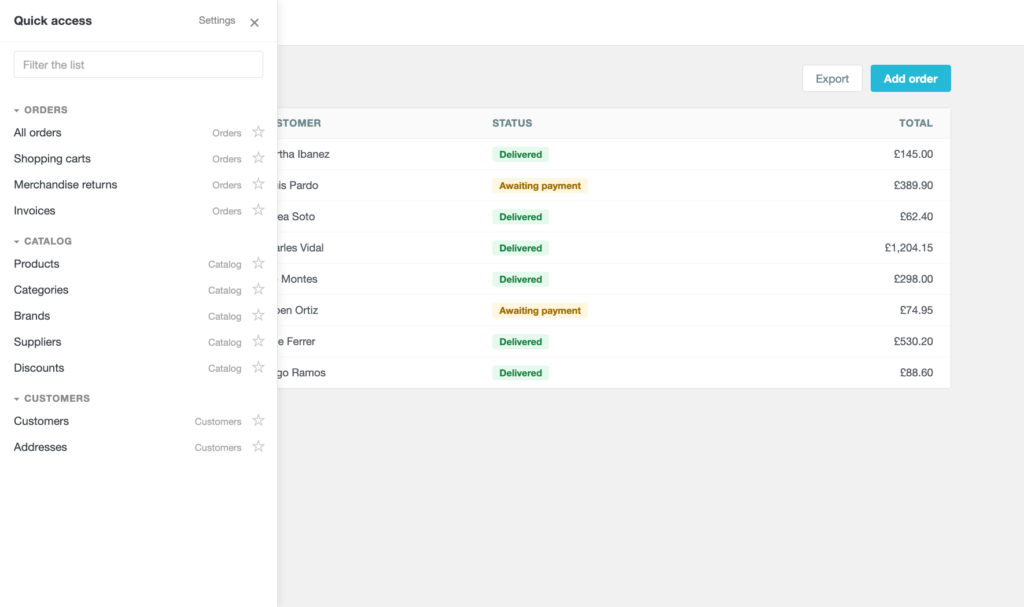
AdminBoost puts a search box on top of all that: you press a key combination, type three letters and you are there. And a side panel with every section in view, the ones you use most right at the top.
It changes nothing in the back office and replaces no menu. It sits on top, and if you uninstall it everything is exactly as it was.
The module in action



Three letters instead of three clicks
The search box opens with a key combination without letting go of the keyboard. You type "perfor" and there are Performance and Catalog performance; arrows to pick, Enter to go.
It searches the name of the section and the menu it lives under, so "orders" brings up everything under Orders even when you cannot remember its exact name.
Everybody has their own favourites
Every screen has a star. What you mark moves to the top of the panel, and it is the first thing the search box offers before you type anything.
Favourites belong to each employee, not to the shop: whoever handles orders marks theirs and whoever handles the catalogue marks theirs, without getting in each other way.
It does not show what cannot be opened
The list is filtered with the permissions of each employee profile. If somebody has no access to Customers, Customers does not appear for them.
It sounds like a detail, but it is the difference between a shortcut and a trap: nothing is more annoying than clicking something only to be told you have no permission.
No index to regenerate
Plenty of modules like this one store a list of screens and give you a "rebuild index" button for when it goes stale. That is an index that will lie to you one day.
Here the list is worked out on the spot, reading the tabs and the modules that exist at that moment. A module you install now appears on the next screen you open, and there is no button to press.
Modules too
Installed modules go into the search by their technical name, the same one you see in the address when you open their settings.
You type "search" and up come all the ones with that in the name, their settings page one Enter away. If you would rather not have them, you turn it off in the settings.
With the keys you want
It comes with Alt+B for the panel and Control+K for the search, which are the ones that clash with nothing in the back office.
If one of them collides with something you use, you change it in the settings by writing it out: one or more of Control, Alt, Shift and Meta, a plus sign, and one letter or number.
It looks like part of PrestaShop
The panel and the search box use the same greys, the same blue and the same type as the back office. No decorative colours, no floating boxes that stand out.
That is on purpose: an add-on that shouts gets in the way, and this is a tool for using fifty times a day.
What it touches and what it does not
It modifies no menu, no back office template and no existing screen. It adds one table of its own for the favourites and nothing else.
Uninstalling it drops that table and leaves the back office exactly as it was.
Requisitos técnicos
| PrestaShop | 1.7, 8.x and 9.x |
| PHP | 7.1 or higher |
| Where it works | In the back office, on every screen |
| External services | None |
| Database | One table, for the favourites |
| PrestaShop | 1.7-9.x |
| Minimum Version | 1.7.0 |
| Maximum Version | 9.0.3 |
| PHP Required | 7.1+ |
Quick Info
- Version
- 1.0.0
- PrestaShop
- 1.7-9.x
- PHP
- 7.1+
- Last update
- October 20, 2026
- License
- 1 domain
- Support
- 3 months
- Languages
- es, en, fr
Categories
Need Help?
Our technical team is available to help you with installation and configuration.
Contact Support →Related Modules
Scans your shop and tells you in minutes whether it is ready for PrestaShop 9: modules, overrides, theme, hooks, server and database. Read-only, and every finding comes with its evidence.
Want to better understand your PrestaShop store performance and sales? AnalyticsBoost adds visual dashboards, advanced metrics and conversion funnels to help you make better business decisions.
Synchronise your PrestaShop stock with Google Sheets bidirectionally. Update inventory directly from the spreadsheet and changes are automatically reflected in the store. Compatible with combinations and multi-warehouse. Compatible with PS 1.7.x, 8.x and 9.x.
