Delivery Promise — Estimated delivery dates with a cut-off countdown for PrestaShop
Show customers when their order will arrive: on the product page, next to each carrier at checkout, in emails and on invoices. Adds a cut-off countdown, warehouse and carrier calendars, national holidays, island and made-to-order rules, and an on-time report.
Customers want to know when their order will arrive, and “24-72 hours” doesn’t really answer that. Without a date they email to ask, buy somewhere else, or order anyway and write to you on Monday because nothing has turned up. Working the date out isn’t simple either: there’s the 14:00 cut-off, the carrier that doesn’t collect on Saturdays, next Thursday’s public holiday and the customer in the Canary Islands.
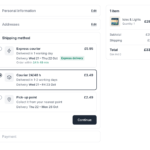
Delivery Promise works the date out for each visitor and shows it on the product page, in the cart, next to each carrier at checkout, in the order emails and on the invoice. When the cut-off is close, a live countdown tells them how long they have left to order.
You can set it up on your live shop in test mode, so only you see the dates until they’re right. Once orders come in, the module records the date it promised each one and shows you how many arrived on time, carrier by carrier.
What it looks like in the shop and the back office




Why the warehouse and the carrier have separate calendars
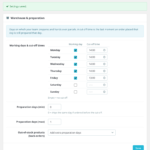
Your warehouse and your carrier don’t keep the same hours. You might pack on Saturdays while the carrier doesn’t collect until Monday, or work until 14:00 while the driver comes at 13:00. So there are two calendars: the days you dispatch, with a cut-off for each weekday, and the days each carrier collects and delivers, with its own pick-up cut-off if it has one.
Say you dispatch Monday to Friday with a 14:00 cut-off and no extra preparation time. An order placed on Friday at 15:10 leaves on Monday, and with 1-2 days in transit the customer sees Tue – Wed. Transit only counts the days that carrier delivers, and the schedules survive when you edit a carrier.
A countdown that recalculates itself at the cut-off
“Order within 3 h 20 min” works because it’s concrete, but only if it’s true. The countdown follows your server’s clock, not the visitor’s computer, so a customer whose clock is wrong sees the same as everyone else. It only appears when the cut-off is close (you choose how many hours), so it doesn’t sit there all day.
When it reaches zero, the block works out the new date by itself without reloading the page. Someone who left the tab open over lunch won’t come back to “Get it tomorrow” when tomorrow is no longer possible.
Holidays and closures without typing them in one by one
The date is only as good as the calendar behind it. National holidays for Spain, Portugal, France, Italy, Germany, Austria, Belgium, the Netherlands, the UK and the US import in one click, with Easter-based dates worked out for each year. Regional holidays can be pasted in bulk, one per line.
Closures can be a date range or repeat every year, even across New Year, and can affect the warehouse, deliveries or both, for all carriers or just one. A 12-month calendar shows dispatch days, holidays and closures together, so you spot the August gap before a customer does.
Made-to-order products, busy weeks and the islands
Not everything ships the same day. A made-to-order sofa may need ten extra days, and during Black Friday week a busy category might need two more. Preparation rules work by product, combination, category, brand or supplier, either adding days or hiding the date, and can have start and end dates. Combination beats product, and product beats category, brand or supplier.
Destination rules work by country and postcode prefix or range. A rule for postcodes 35 and 38 (Canary Islands) or 07 (Balearics) can add days, replace the transit time or exclude a carrier that doesn’t go there.
Checking the date before and after you promise it
When a customer asks why they were shown Thursday, the simulator gives you the answer. Pick a date and time, product, quantity, country and postcode, and carrier, and you get the date with each step behind it: cut-off passed, weekend, holiday, preparation, transit. It’s also the quickest way to test a new rule.
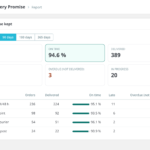
After that, every order keeps the window it was promised. The module records when it ships and when it arrives, using the order statuses you pick, and shows the percentage delivered on time per carrier, plus late and overdue orders. You can edit or recalculate the promise from the order page.
Setting it up on a shop that’s already selling
You don’t need a staging copy to set this up. Test mode shows the dates only to the IP addresses you enter, so you can fill in calendars and rules on the real shop while customers see nothing. When the dates look right, you switch it off.
There are no overrides and no cron job, so core files stay untouched and nothing depends on a scheduled task. Orders from marketplaces such as Amazon or eBay can be ignored, so those customers don’t get a second, different date. If you uninstall the module, its five tables go with it.
Requisitos técnicos
| PrestaShop | 1.7.8, 8.x and 9.x |
| PHP | 7.1 or higher |
| Theme | Classic, Hummingbird and themes built on them, through standard hooks; {widget name='ptdeliverypromise'} places the block anywhere else |
| Database | Five tables of its own, removed on uninstall |
| Cron | Not needed |
| Overrides | None |
| Multistore | Supported |
| Languages | Spanish, English, French and Italian (shop texts also in German and Portuguese) |
| PrestaShop | 1.7.8-9.x |
| Minimum Version | 1.7.8 |
| Maximum Version | 9.1.5 |
| PHP Required | 7.1+ |
Quick Info
- Version
- 1.2.0
- PrestaShop
- 1.7.8-9.x
- PHP
- 7.1+
- Last update
- October 20, 2026
- License
- 1 domain
- Support
- 3 months
- Languages
- es, en, fr, it
Categories
Need Help?
Our technical team is available to help you with installation and configuration.
Contact Support →Related Modules

Adds the Amazon-style “bought together” block to your product pages: two or three products, the saving, and one button that adds them all. The discount is a real PrestaShop cart rule, so it disappears on its own if the customer breaks up the bundle.

Shows a live countdown to the end of every discount. It reads the promotions you already have: nothing to configure product by product.
Show customers how much is left to qualify for free shipping with a progress bar that updates by itself. Raises your average order value without touching prices.
